
PREMIUM
Siemens NX Assemblies: Override Position of Robots
Course content
b2a-1
Siemens NX Assemblies: Fundamentals, Best Practices & Workflow
12:59 Min
b2a-2
Siemens NX Assemblies: Load options, selection and scope
11:53 Min
b2a-3
Siemens NX Assemblies: Load options, storage location
10:52 Min
b2a-4
Siemens NX Assemblies: Absolute positioning, important basics
PREMIUM
08:18 Min
b2a-5
Siemens NX Assemblies: Assembly Constraints
PREMIUM
43:54 Min
b2a-6
Siemens NX Assemblies: Constraints Navigator
PREMIUM
14:11 Min
b2a-7
Siemens NX Assemblies: Define Different Component Positions with Arrangements
PREMIUM
16:08 Min
b2a-8
Siemens NX Assemblies: Clip Section
PREMIUM
10:33 Min
b2a-9
Siemens NX Deformable Parts: Adapt Form, Keep the Same File Name, Parameters
PREMIUM
19:59 Min
b2a-10-e
Siemens NX Deformable Parts: Adapt Form, Keep the Same File Name, References
PREMIUM
30:07 Min
b2a-11
Siemens NX Reference Sets: Control Detail Level & Performance
PREMIUM
18:51 Min
b2a-12-e
Siemens NX Free tool to create involute gears, gearwheels, gearboxes
PREMIUM
50:14 Min
b2a-13
Siemens NX Assemblies: Mirror Assembly
PREMIUM
15:16 Min
b2a-14-1
Siemens NX Assemblies: Attributes
PREMIUM
15:42 Min
b2a-14-2
Siemens NX Assemblies: Attribut Template
PREMIUM
08:47 Min
b2a-15-1
Siemens NX Assemblies: Override Position
PREMIUM
05:33 Min
b2a-15-2
Siemens NX Assemblies: Override Position of Robots
PREMIUM
16:09 Min
b2a-16
Siemens NX Interpart Expressions: Parametrize Assemblies Centrally
PREMIUM
23:39 Min
b2a-17
Siemens NX Assemblies: Clone Assembly
PREMIUM
15:10 Min
b2a-18
Siemens NX Assemblies: Standard Parts, free library
PREMIUM
12:03 Min
b2a-19-1
Siemens NX WAVE Geometry Linker: Create Associative Geometry Links
PREMIUM
20:51 Min
b2a-19-2
Siemens NX Assemblies: WAVE with Product Interface
PREMIUM
06:31 Min
b2a-19-3
Siemens NX Assemblies: WAVE with False Bodies
PREMIUM
20:17 Min
b2a-19-4
Siemens NX Assemblies: Distribute WAVE links centrally
PREMIUM
19:06 Min
b2a-20-e
Siemens NX Assemblies: Sequence
PREMIUM
16:33 Min
About this lesson
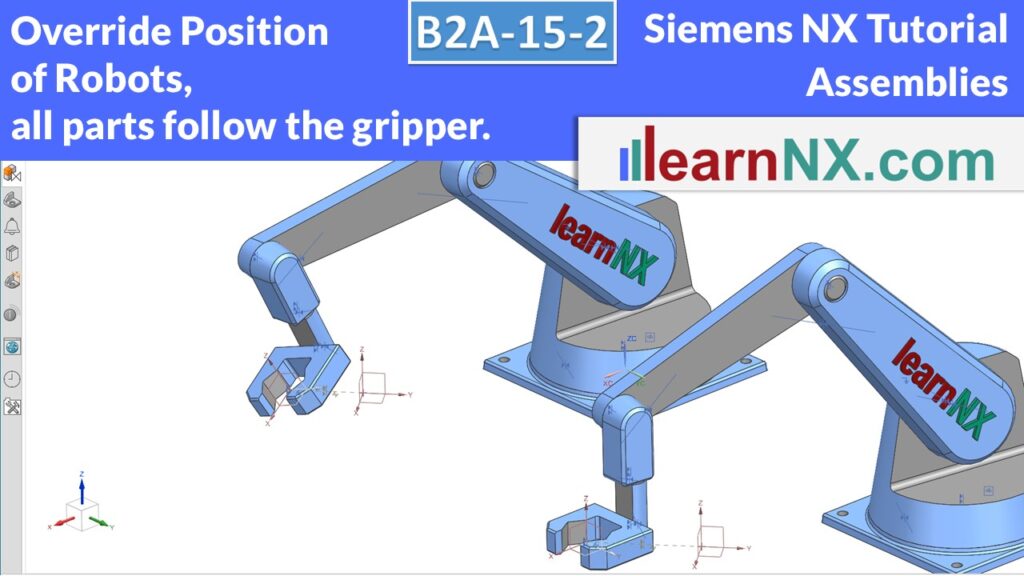
Next level: when identical assemblies have to be different…
In the second part of the course you will now learn to select the constraints of a robot in such a way that you can move the gripper freely in space. The Override Position command makes it possible to overwrite the constraints created in the first step in an overridden assembly. In this way, several identical robots can grip individually. If you want to participate actively: the assembly shown is available for download. The data is in stp format. This means that users of older NX versions can also use the data. You will find the link in the description.